



- Key Takeaways
- Problems With Manual Production and Inventory Management (and How to Fix Them)
- How PrintXpand ERP Can Solve These Challenges?
- What Your Business Can Look Like After Implementing PrintXpand ERP
- Why PrintXpand ERP Can Be the Right Fit For You
- How You Can Successfully Implement PrintXpand ERP
Key Takeaways
- Managing print production and inventory manually opens the door to errors, delays, and coordination breakdowns across teams.
- Print manufacturing workflow automation can solve these problems by automating job order management and combining BOM management software with real-time inventory updates.
- PrintXpand ERP, for example, is a print production management system that automates work orders and schedules jobs.
- Reducing print production errors with ERP software may boost accuracy, efficiency, and consistency while saving time and money.
- Automated print inventory management can provide firms with real-time visibility into material levels, eliminating stockouts and waste.
- Automated job order management enables print producers to increase operations while reducing manual complexity.
Most print manufacturers think they have a scheduling problem. They don’t.
They have a coordination problem that looks like a scheduling issue, because that’s where it breaks first. The schedule falls apart when inventory counts are wrong. Jobs get delayed when BOMs aren’t updated. Rush orders create chaos because nothing in the system talks to anything else.
Managing your print production and inventory manually means every piece of information lives in a different place. Your BOM is in a spreadsheet, your schedule is on a whiteboard, and your inventory count is in someone’s email from yesterday. When a customer calls asking about their job, you’re checking three places to give them one answer.
This is inefficient and expensive! Every manual handoff creates a risk of something that can go wrong. And in print manufacturing, those mistakes show up as missed deadlines, wasted materials, and frustrated customers.
But what if your BOM management software, print job scheduling software, and print inventory management actually could work together? What if one system could handle automated job order management while enabling manufacturing workflow automation across your entire operation?
Well, that’s precisely what a print production management system can do. In this blog, we’ll show you how reducing print production errors with ERP software changes everything about how you run jobs.
Problems With Manual Production and Inventory Management (and How to Fix Them)
Even experienced teams struggle to manage print production and inventory manually. Outdated spreadsheets, broken communication, and reactive inventory checks can quickly create a cycle of errors and wasted time. As a result, employees may spend hours cross-referencing BOMs, re-entering work orders, and searching for job updates across their disjointed systems. This constant back-and-forth movement of information shows that manual processes are not only inefficient but also a key bottleneck in the overall business growth.
So, how do they affect a business when it tries to grow its production? Manual processes might seem “good enough” when handling a handful of orders, but growth exposes every weakness. What was once a small delay becomes a production backlog. A missed update that caused minor confusion now results in entire jobs going off-track. And what looked like a manageable spreadsheet yesterday quickly snowballs into a maze of data errors today. Instead of scaling smoothly, businesses hit a ceiling where every new order adds disproportionate stress, cost, and risk. In short, manual systems don’t just slow growth — they make it unsustainable.
This is why it’s critical to look closely at where manual production and inventory systems break down. Below are the most common areas that consistently hold print manufacturers back.
Disconnected BOMs
BOMs living in static spreadsheets rarely reflect live inventory or SKU variations. A simple oversight, like forgetting to update paper stock, can derail an entire job. With BOM management software, material requirements link directly to inventory, so every order carries the correct details automatically.
Outdated Work Orders
Handwritten notes or outdated templates often reach the production floor, missing key specifications. Presses sit idle while operators wait for clarification, losing valuable production time. By switching to automated job order management, job cards are generated instantly from confirmed orders, complete with accurate instructions.
Communication Chaos
When updates are spread across email threads, chats, and other conversations, it gets difficult for managers to get a full picture of what is actually going on the floor. Instead of coordinating production, they spend time chasing information. A print production management system solves this with real-time dashboards where everyone works from the same data.
No Standardization
Without standardized workflows, even repeat jobs feel like starting from scratch. Take a reprint job of a thousand brochures, for instance. It may need the same amount of setup work you’d put into a completely new order. Using workflow templates for such tasks can remove this inefficiency while ensuring that repeat jobs follow the same, proven steps each time.
Reactive Inventory Tracking
Stock levels are often updated only after production finishes. This reactive approach leads to presses stalling mid-run because materials run out, or to excess stock tying up capital. A print inventory management system updates levels in real time as materials are consumed, preventing both shortages and waste.
Hybrid Order Complexity
When one order includes both in-house printed items and traded products, teams must manually split the job across different systems. This creates unnecessary overhead and increases the risk of errors. With the right ERP system in place, managing hybrid flows becomes far more straightforward. It can route manufactured goods toward production while directing traded products to procurement without any manual efforts. And once manufacturers start using these automated processes, they shift from constantly putting figthing the issues to preventing them before they even arise. And that results in comparatively fewer mistakes, smoother day-to-day operations, and production runs that stay consistent over time.
How PrintXpand ERP Can Solve These Challenges?
If you’ve ever had to cross-check three different spreadsheets just to confirm a job, you already know the pain of disconnected systems. PrintXpand ERP takes that chaos off your plate by digitizing and automating every stage of the workflow. Instead of piecing together BOMs, work orders, and inventory updates manually, you get one system that ties everything together and actually understands how print manufacturing works.
The automation upgrades that can change how you work:
- Automated BOM setup
Instead of spending hours checking stock levels and cross-referencing spreadsheets before every job, you can implement automated BOM setup with PrintXpand ERP. Each SKU comes with a dynamic BOM preloaded in the system. The moment an order is confirmed, the right BOM is automatically attached. Therefore, there will be no manual lookup, no outdated data, and no costly errors as well.
By implementing this, you can save valuable time. Plus, your team no longer has to recheck or correct entries. They can simply move jobs forward confidently and keep production on schedule.
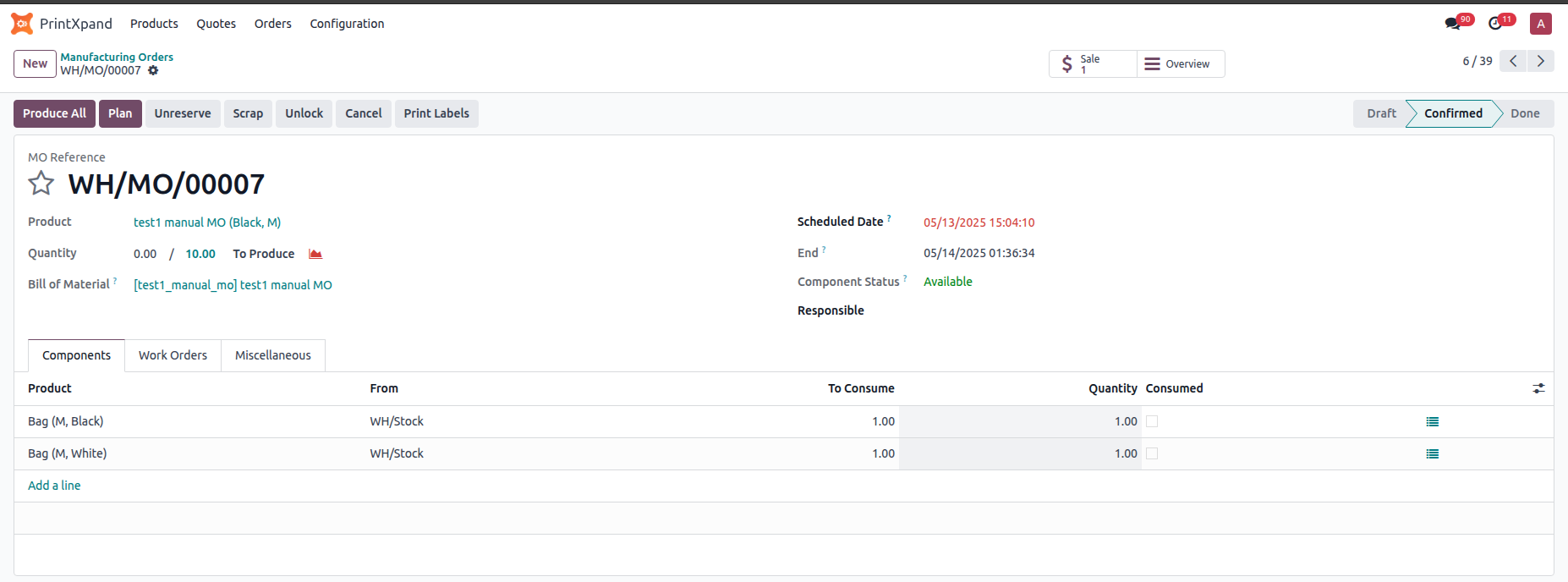
Well, when an order includes both manufactured and traded items, BOM automation helps the system instantly distinguish between what needs to be produced and what needs to be purchased. Manufactured items trigger automated production BOMs, while traded items trigger supplier purchase orders. By implementing this, hybrid jobs move forward without splitting workflows manually.
- Pre-built work order templates
Re-entering job details repeatedly is frustrating and risky. One typo or missed step can derail an entire production run. But with standardized templates, every job begins with the exact, reliable instructions. You can still make custom adjustments as and when required.
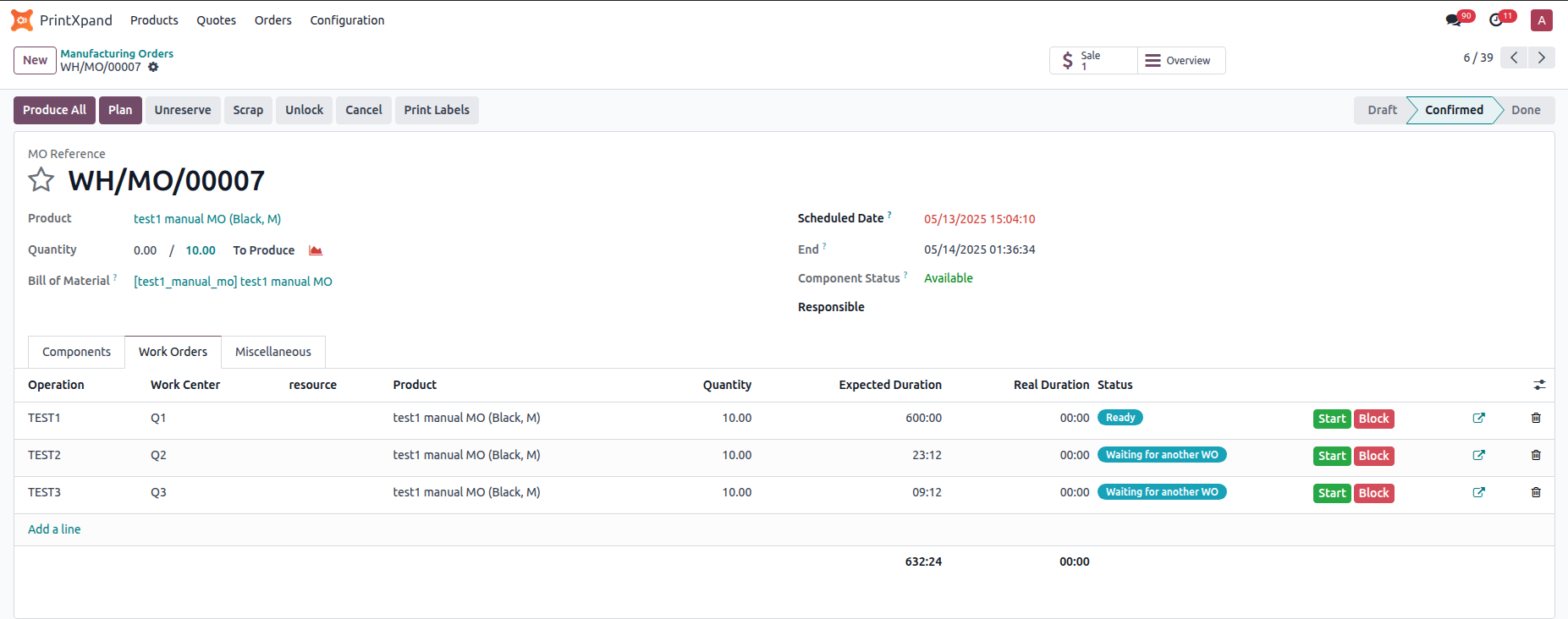
- Auto-generated job cards
Delays often happen simply because the job card isn’t ready. Well, with PrintXpand ERP, you can eliminate that. How? Well, that’s because it can help you generate job cards automatically.
The system generates job cards as soon as an order is confirmed. In short, production no longer has to wait for all of the paperwork that it once did. It further eliminates idle time, keeps daily workflows moving, and helps meet all deadlines without difficulty. Beyond that, job cards become data points using which you can compare planned versus actual performance in real time, spot inefficiencies quickly, and also adjust schedules on the fly.
| Expert Tip: | |
|---|---|
| Don’t use job cards only for scheduling. To get the most value from them, use them to track performance on the shop floor. By comparing planned and actual completion times across different jobs, you can spot which machines, shifts, or job types consistently run faster or slower than expected. Many print manufacturers don’t realize they can use this data to renegotiate customer deadlines, balance team workloads, and even identify training needs. Simply put, you can use the job cards as a powerful tool for ongoing operational improvements rather than just for automating paperwork. | |
- Intelligent scheduling
You can implement intelligent scheduling with PrintXpand ERP to eliminate the guesswork in assigning jobs. Tasks will be automatically assigned to the right machines and staff members based on their availability and priority. This means there will be no morning huddles trying to figure out who should handle what. Put simply, with the advanced system, scheduling can be done intelligently and consistently without manual intervention.
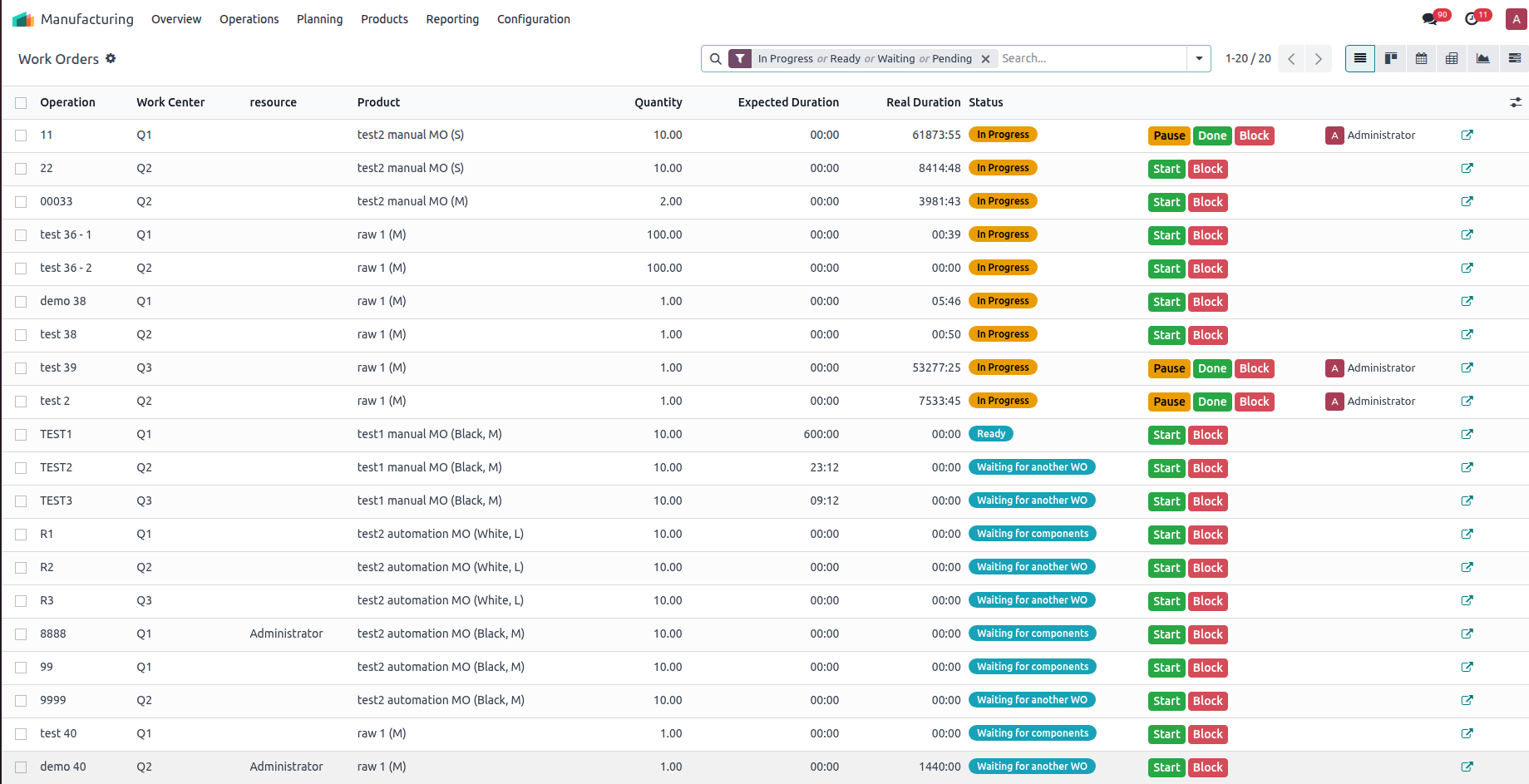
- Live production tracking
You can set up and use live production tracking to give managers real-time visibility into shop floor progress. Even the staff members will be able to update their job status in real time. Additionally, this system will make it easier for them to identify delays and bottlenecks before they become major problems.
In a nutshell, if you put the live production tracking system in place, you can collect data while also creating accountability and transparency throughout the workflow. And the best part is that these real-time updates will also enable your managers to address issues as and when they arise, preventing minor hiccups. Your team will also remain motivated to work efficiently because they know their progress is visible and valued.
- Real-time inventory sync
PrintXpand ERP can implement real-time inventory sync, which automatically updates materials as they are consumed during production. The solution simply eliminates manual reconciliation errors and gives you crystal-clear visibility into stock levels for upcoming jobs. So, with the ERP running your operations, you can avoid last-minute stockouts and production stoppages. That’s not all! You can also empower your team to plan ahead rather than scrambling under pressure.
The hybrid order breakthrough:
You can implement hybrid order automation with PrintXpand ERP to simplify jobs that include both in-house production and supplier-sourced items. Instead of splitting orders manually and tracking them in separate systems, everything can be managed in one connected flow.
By implementing this print manufacturing workflow automation system, your team can follow orders from start to finish without confusion, and your customers can receive accurate updates at every stage. PrintXpand ERP is workflow-aware. It coordinates every step —from production and purchasing to delivery —so you benefit from fewer delays, improved team collaboration, and the ability to scale without complexity.
If you’re already tired of manually juggling hybrid orders and dealing with confusion at every turn, this is the right time to reconsider your strategy.
What Your Business Can Look Like After Implementing PrintXpand ERP
When you implement PrintXpand ERP, the improvements you see aren’t just operational but they’re measurable too. Here’s what you can put in place across your business:
Error reduction and efficiency gains:
- You can implement automated workflows that reduce manual errors by up to 70%, especially in BOM selection and work order documentation. Instead of dealing with constant rework, your team can rely on consistent processes and accurate data.
- You can also save up to 2–3 hours every single day in coordination time between production, inventory, and procurement. By putting this in place, your staff can focus on optimizing workflows and improving output instead of chasing updates or reconciling spreadsheets.
- With pre-attached and reusable components, you can implement BOM creation that’s up to 80% faster, getting jobs into production without unnecessary delays.
Delivery and cost improvements:
- You can implement standardized processes and real-time job tracking to improve on-time deliveries by 40%. This makes it easier to meet commitments, keep customers satisfied, and give your sales team the confidence to promise accurate timelines.
- You can also reduce material waste through real-time inventory tracking and accurate BOM management. Better cost control can be implemented too, as managers gain visibility into exactly what materials are being consumed for each job.
Scalability breakthrough:
You can implement a system that grows with you. PrintXpand ERP handles increasingly complex workflows without adding more manual workload or requiring extra staff just to manage coordination.
Most importantly, you can reduce team stress. By removing the friction of scattered tools and processes, your team can focus on what they do best: producing high-quality print products efficiently and consistently.
| Expert Tip: | |
|---|---|
| When you implement workflow automation, track the return on investment (ROI) for each area individually. For example, measure how much time your team saves in coordination compared to the savings from reducing material waste. Many print manufacturers find that the time saved in communication and job setup actually results in a bigger financial benefit than expected. By identifying which improvements bring the most value, you can prioritize your next steps in automation with greater confidence and a clearer understanding of what drives the most impact. | |
Why PrintXpand ERP Can Be the Right Fit For You
Many generic ERPs and traditional MIS tools fail to meet the unique needs of print manufacturing. With PrintXpand ERP, you can implement a system designed specifically for your industry, understanding SKU variants, job card formats, and the hybrid nature of modern print operations.
Here’s What made PrintXpand ERP different:
- Industry-specific design
Unlike generic ERPs that force you to choose between managing trading and manufacturing workflows separately, you can implement PrintXpand ERP to integrate both seamlessly. This is ideal if your business outsources some jobs and handles production in-house, as it lets you manage everything in a single, unified system without confusion.
- Easy implementation
Many traditional MIS systems require extensive retraining and disrupt daily operations during implementation. With PrintXpand ERP, you can implement it quickly with minimal disruption, thanks to its modular, web-based design. Your team won’t need to spend months learning a new system, allowing you to get back to work faster.
- Flexible integration
Generic ERPs often require you to overhaul your existing processes and vendor relationships completely. You can implement PrintXpand ERP without that hassle. It integrates smoothly with your current setup, meaning you don’t have to start from scratch or adjust your established workflows and relationships.
- Practical automation
Generic ERPs may overcomplicate things with unnecessary features or complexity. PrintXpand ERP automates only what matters to you—the day-to-day tasks that directly affect your operations. You can implement intelligent automation without dealing with excess complexity, focusing on solving your print manufacturing challenges rather than managing unnecessary functions.
How You Can Successfully Implement PrintXpand ERP
Implementing PrintXpand ERP doesn’t have to be overwhelming. By following a few best practices, you can make the transition smoother and see tangible results faster. Here’s how you can set yourself up for success:
- Prioritize High-Impact Modules First: Don’t try to implement everything at once. In Phase 1, focus on high-impact modules like job order automation, live production tracking, and BOM sync. These areas usually deliver the quickest operational wins. In Phase 2, you can tackle more advanced features like dynamic pricing, supplier integration, or customer self-service portals. By starting with quick wins, you’ll build your team’s confidence and generate early ROI, making it easier to justify further investment.
- Prepare Your Data Before Migration: Before implementing, clean up your data. Make sure your product SKUs, BOM details, customer records, and supplier lists are accurate and well-organized. Skipping this step can slow down your setup, cause errors, and frustrate your team. By ensuring clean, structured data, you can speed up the go-live process and prevent trust issues down the line.
- Build Templates for Repeat Jobs: Investing time upfront in work order templates, BOM templates, and common hybrid order setups will save you time later. By doing this, you can reduce manual effort and errors across multiple jobs. Pre-built templates make processes smoother and help less experienced staff follow consistent, reliable workflows.
- Roll Out With Pilot Teams: You can implement PrintXpand ERP with a pilot team or product line before going company-wide. This allows you to test the system, identify potential gaps, and refine workflows. Running a controlled pilot minimizes risks, uncovers blind spots, and makes the full rollout easier and smoother.
- Train for Workflow, Not Just Software: When implementing PrintXpand ERP, focus on training your staff on the new workflows, not just the software itself. Help them understand which manual tasks are being eliminated, what new alerts or dashboards to watch for, and how these changes will help reduce stress and improve efficiency. Clear communication and understanding can ease the transition and help your team adopt the system with confidence.
- Keep a Feedback Loop Open: After the system goes live, you can implement regular check-ins to monitor progress. Ask, “What’s working well? Where are the pain points? What features need tweaking?” ERP success isn’t just about the initial setup; it’s an ongoing optimization journey. By keeping the feedback loop open, you ensure continuous improvement.
PrintXpand ERP helps print manufacturers reduce operational chaos, speed up delivery, and scale effectively, without increasing complexity. It transforms manufacturing process automation from a stress point to a real competitive advantage.
So, if your print business is still coordinating production using spreadsheets and manual processes, it’s time to see how automated job order management might improve your operations. To get started, get a personalized demo to learn how PrintXpand ERP can optimize your specific workflows and reduce the everyday coordination chaos that is holding your business back.
All product and company names are trademarks™, registered® or copyright© trademarks of their respective holders. Use of them does not imply any affiliation with or endorsement by them.