
Web to Print
Challenges & Best Practices When Setting Up a Web-to-Print Store: A Guide for First-Timers





The world of printing is moving at a faster pace than a caffeinated intern on a Monday morning. If you are going to stick with the old workflows, you are taking a wrong step in this age of instant satisfaction.
The print shops and apparel stores switching to web-to-print solutions do so because the process eliminates the tedious, time-consuming email chains that occur with every order. Customers now see product personalization as a basic feature, not a luxury of the future.
An inexperienced person setting up a web-to-print store usually looks like a toddler attempting open-heart surgery. It is messy, costly, and involves a lot of unnecessary crying. Yet if the transition is planned carefully, the chaotic shop can be turned into a money-making machine.
Having the right technology and being optimistic are no longer enough; print shops need a live online presence.
Common Challenges First-Timers Face
Setting up an online print shop can feel like trying to build a plane while it’s already in the air. While the goal is a seamless customer experience, first-timers often hit several technical and operational walls that can turn a dream project into a digital headache.
Choosing the Right Platform
Picking a software partner often feels like a blind date that ends in a house fire. Most people grab the first cheap option they see and regret it by lunch. Finding a scalable platform is harder than finding a quiet spot at a rock concert.
Many realize too late that their new tool hates their existing website. Compatibility issues turn a simple setup into a digital civil war. A platform that cannot grow is just an expensive paperweight for the business.
Complex Product Customization Setup
Setting up a designer tool usually makes people want to throw their monitors out the window. Managing five hundred design options requires the patience of a saint on a good day. Creating product templates often feels like solving a Rubik’s Cube in a dark room.
The majority of users are overwhelmed by the wide selection of fonts and clipart while the time runs out. The online product personalization process is meant to be very user-friendly and, at the same time, a staff nightmare. The backend, without a proper arrangement, resembles a digital junk drawer.
Integration Issues
Real-time order syncing is the stuff of urban legends for many new owners. Orders get lost in the void between the storefront and the production floor. The creation of print-ready files requires manual work that not only consumes time but, more importantly, instantly reduces productivity.
The time it takes for files to be rendered is as thrilling as watching a stormy day paint dry. Web-to-print solutions should connect departments, not build walls between them. If the systems do not talk to each other, the humans will start screaming at each other.
Pricing Complexity
Dynamic pricing is a beast that bites the hand that feeds it. Calculating costs based on material, ink, and design area is enough to cause a migraine. One small math mistake means selling high-end shirts for the price of a gumball.
Most stores struggle to keep their price lists from looking like tax returns. Customers want instant quotes, not a “we will call you later” promise. If the pricing engine stalls, the sales figures will follow suit.
Lack of Technical Knowledge
Operating a designer tool is not a piece of cake for the non-technical. Update and hosting management feel like trying to repair a jet engine while it’s still flying. Performance slowdowns can turn a quick web-to-print store into a digital snail.
Most shops do not have a full-time IT person who can save them from the Blue Screen of Death. Technical debt tends to accumulate faster than dirty laundry in a student dormitory. Without expert assistance, the entire setup eventually starts to emit smoke.
Operations & Fulfillment Challenges
Approval workflows are where good designs go to die. Reducing design errors feels like herding cats across a busy highway. One tiny typo from a customer leads to a mountain of wasted inventory and tears.
Ensuring production accuracy is a constant battle against human error. If the fulfillment process is broken, the fancy website is just a facade. Success requires a tight ship, or the business will end up underwater.
Best Practices to Set Up a High-Converting Web-to-Print Store
Building a successful store is about more than just going digital; it is about creating a smooth, reliable experience that keeps customers from hitting the “back” button. By following these proven strategies, you can bypass the common growing pains and build a storefront that practically runs itself.
Choose a Future-Proof Platform
Settling for a rigid system is like buying a pair of shoes two sizes too small. Growth happens fast, and a platform that caps your SKUs is a death sentence. Select a foundation that handles an unlimited product catalog without breaking a sweat.
API-based integrations are non-negotiable for anyone who values their sanity. These connections ensure your software can communicate with your CRM and ERP without a human translator. Building on a weak base is just a slow way to fail.
Use a Professional Online Designer Tool
A clunky interface is the fastest way to send customers running to your competitors. High-quality 2D or 3D visuals give buyers the confidence that they aren’t buying a total disaster. Preloaded templates act as a safety net for people with zero artistic talent. The tool must spit out print-ready files so your production team doesn’t have to fix amateur mistakes.
Since most people shop while distracted on their phones, a mobile-responsive designer is mandatory. If the tool is hard to use, the online product personalization process becomes a chore instead of a sale.
Simplify the User Journey
The complexity of the process is the unnoticeable factor that reduces the chances of a sale in the web-to-print market. Single-click customization is the momentary action that keeps the buyer from losing interest. Get rid of every kairos between the artwork and the cart icon.
Have the user challenged and engaged by the clear call-to-actions like the lighthouse in the storm. A potential buyer who has to go through ten pages to get the desired mug will probably quit. So keep the process short and the resistance low to maintain cash flow.
Set Up Automated Approval & Print-Ready Outputs
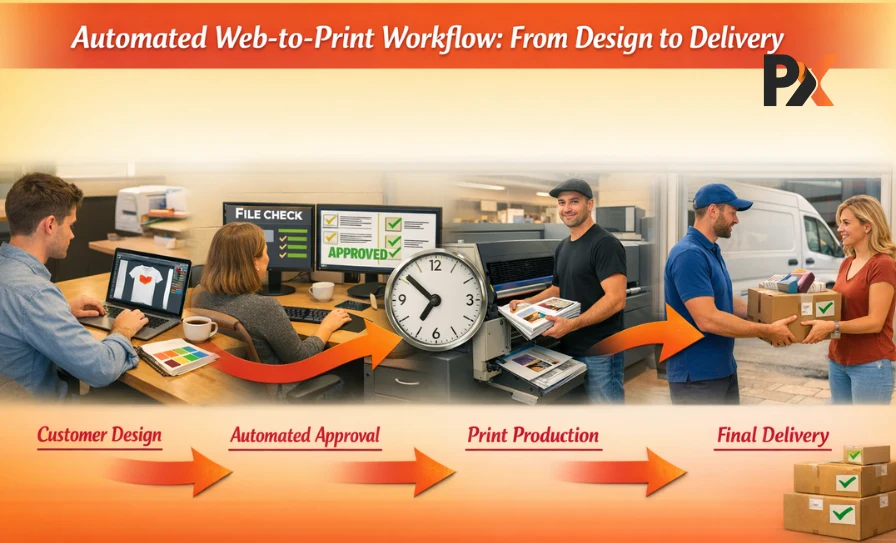
Manual approvals are a black hole for your company’s time and money. Automation catches errors before they hit the expensive machinery on the floor. Saving production time is the only way to scale without hiring an army of designers.
Getting a perfect file every time keeps the shop running like a well-oiled machine. It prevents the nightmare of printing five thousand shirts with a glaring typo. Reliable web-to-print solutions handle the heavy lifting while you focus on the big picture.
Offer Transparent & Smart Pricing
Hidden fees are a great way to lose a customer for life. Real-time pricing updates should reflect every change in the material or design area instantly. People appreciate a clear breakdown of charges because nobody likes unpleasant surprises at checkout.
If the price jumps around like a caffeinated rabbit, trust vanishes. Smart pricing engines ensure the house always wins while keeping the buyer happy. Transparency builds a bridge of trust that leads to repeat business.
Provide Strong Customer Support
The moment a disaster strikes, a chatbot can be the first line of defense. Quick answers help avoid situations where a small uncertainty leads to a canceled order. Returning products without charge might seem like a hassle for the company, but it is a clear sign that the company has faith in its products.
Customer service is a barrier that prevents unhappy users from writing nasty reviews. Give close attention to every inquiry or risk damaging the store’s reputation. Being available is not a customer’s privilege; it is a requirement for doing business.
Test the Store Before Going Live
Launching without testing is like jumping out of a plane and sewing the parachute on the way down. Run test orders through every possible scenario to find the hidden bugs. Check the designer tool performance on every browser known to man.
Mobile testing is crucial because that is where the most chaos happens. Identify the friction points before your customers do. A smooth launch is the result of obsessive checking, not luck.
How Web-to-Print Technologies Improve Store Efficiency?
Integrating the right technology does more than just move your business online; it removes the bottlenecks that slow down your daily operations. By automating the heavy lifting, you can transform a chaotic production floor into a high-speed system that delivers better results with less effort.
Reduced Manual Artwork Creation
Manual design work is a bottomless pit that swallows billable hours. Modern web-to-print solutions let customers do the heavy lifting while your designers actually go home on time. It stops the endless back-and-forth emails that lead to nothing but frustration.
Fewer Errors
Human error is the silent assassin of profit margins in any shop. Automating the design process removes the chance of a tired employee misreading a scribble. What the customer sees is exactly what the machine prints.
Faster Order Handling
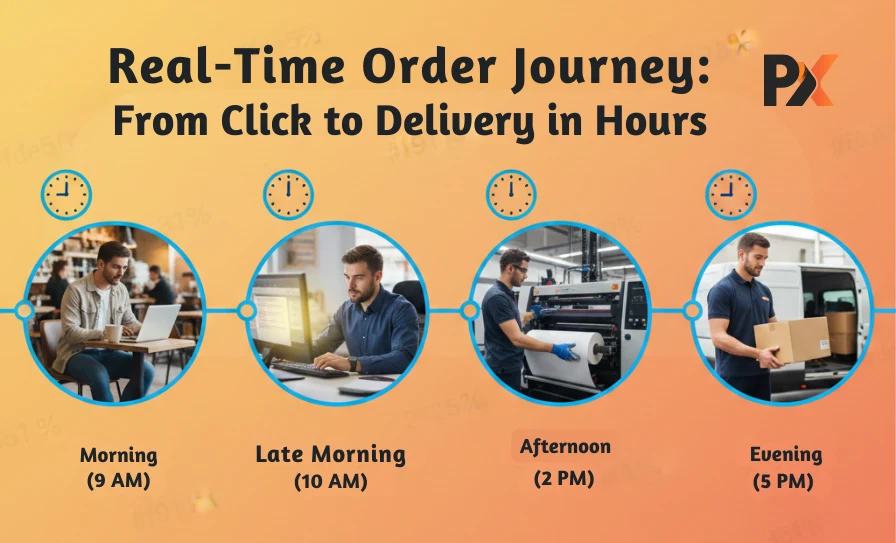
Speed is the name of the game if you want to stay relevant. Orders move from the web to the print store to the production queue in seconds. There is no more digging through spreadsheets to find out who ordered what.
Smooth Customer Experience
A seamless online product personalization process keeps people from bouncing to a competitor. A frictionless interface makes buying custom gear as easy as ordering a pizza. Happy customers are significantly less likely to call and complain.
Integrated Order-To-Production Workflow
A connected system enables one department to be aware of what is happening in another. The workflow goes smoothly like water through a pipe rather than being hindered like a clogged drain. Therefore, production stays on track without requiring constant oversight.
Mistakes to Avoid While Setting Up a Web-to-Print Store
Buying a bargain-bin design tool is a fast track to professional suicide. Cheap software crashes more often than a teenage driver wearing a blindfold. Ignoring mobile responsiveness is equally brilliant if the goal is to alienate every customer with a smartphone.
A web-to-print store that looks like a broken puzzle on a mobile screen is just embarrassing. Failing to test print-ready files will result in a dumpster fire of wasted materials and angry emails. Slow page load speeds act like a giant “closed” sign for your business. Most people have the attention span of a goldfish and will not wait for a heavy site to load.
Overcomplicating the steps for online product personalization is another classic way to shoot yourself in the foot. If a customer needs a PhD to design a t-shirt, they will take their money elsewhere. Avoid these pitfalls or prepare to watch your investment go down the drain.
Using reliable web-to-print solutions is the only way to keep the doors open and the machines humming.
Why PrintXpand Is the Best Solution for First-Time Store Owners?
Finding a tool that balances power with simplicity is the secret to launching without the usual technical headaches. PrintXpand bridges this gap by offering a user-friendly environment that handles the complex backend work so you can focus on growing your brand from day one.
Easy Setup
The entire process of getting started should not be comparable to building a rocket ship in a basement. The installation is so smooth that it won’t result in a total mental breakdown on the first day. It cuts through the technical noise, so attention is on selling rather than fixing bugs.
Ready Templates
Starting with a blank canvas is a nightmare for most customers. Preloaded templates save everyone from the horror of terrible DIY designs. These layouts act as silent partners, keeping quality high without extra effort.
3d Design Support
Flat images are relics from a bygone era that belong in a museum. 3D support allows buyers to see exactly how their online product personalization looks from every angle. It stops the guessing game and slashes return rates into tiny pieces.
Integrations With Shopify, Woocommerce, Magento, Bigcommerce, And Many More
This software plays well with others instead of being a digital hermit. Whether the current shop runs on Shopify or Magento, the connection is seamless. It bridges the gap between different platforms without requiring a team of expensive developers.
Automated Artwork Generation
Manual file prep is a soul-crushing task that kills company morale. Automation turns messy customer designs into perfect print-ready files instantly. It ensures that the web-to-print store operates like a high-speed assembly line.
Printing Workflow Integration
The system connects the front office directly to the greasy machinery on the floor. A unified workflow means no more lost tickets or confused operators. It is the ultimate insurance policy against operational chaos in web-to-print solutions.
Closing Lines
Setting up a shop is never a walk in the park. Challenges are as natural as rain in London, but they shouldn’t sink the ship. Pairing the right platform with solid best practices leads to a smooth launch that won’t make the hair turn gray overnight.
Adopting scalable web-to-print solutions is the only way to stay ahead of the pack. Sticking to outdated methods is just a slow march to the graveyard. Embrace online product personalization to keep the register ringing.
A robust web-to-print store turns a mountain of work into a molehill. Don’t let the technical hurdles win. Take the plunge and watch the business thrive.