


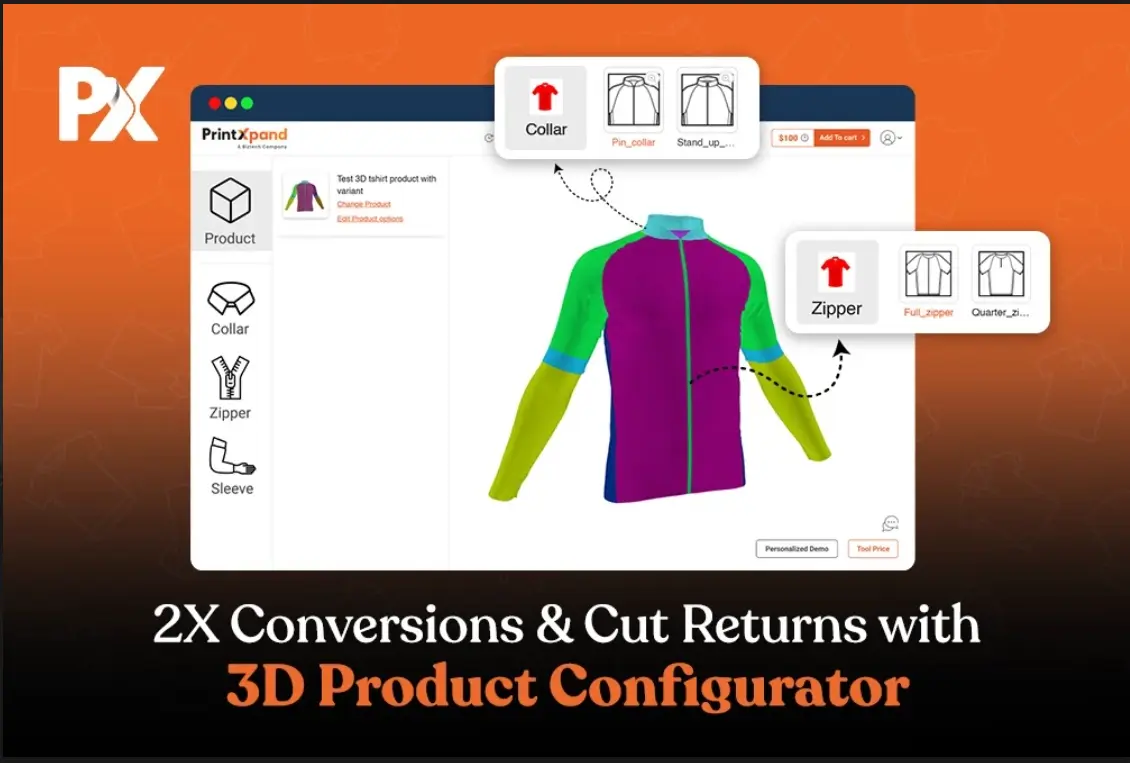
A buyer wants customized T-shirts. They select the material, sleeve length, and neckline, upload the artwork, and then pause, thinking, “What will this actually look like?” The preview doesn’t show the texture, design placement, and the product just feels…unfinished.
Because of this uncertainty, they hesitate and eventually abandon the quote, turning what could have been a smooth purchase into a conversion killer and a typical CRO breaker.
Let’s be clear that this isn’t a small UX issue. It’s a scalable revenue leak for web-to-print businesses like yours.
Buyers today expect robust product configuration, including materials, finishes, folds, and textures. However, most platforms still show only flat 2D previews or static PDF proofs, which fail to build confidence and ultimately discourage purchases.
Reports show that adding 3D product content can reduce return rates by up to 40%. In fact, 89% of retailers agree that 3D content significantly helps prevent returns.
Even the US-based Home Furnishing giant ‘Rowe Furniture’ recently reported that their B2B online sales doubled since launching 3D product visualization. This is the kind of immersive 3D product configuration that removes the ‘guesswork’ issue by offering real-time, 360° visualization and part-by-part customization. To be honest, this is something your business can implement without disrupting existing workflows. And, today, that’s exactly what buyers expect to see before they click “Buy.”
Let’s further discuss how web-to-print leaders use interactive product configurators and real-time 3D
What Is 3D Product Configuration and Why Does It Matter in Web-to-Print
Generally speaking, 3D product configuration tool allows buyers to interact with a virtual version of a product in real time. They can change its structure, style, and design, and instantly see every update from all angles. This is an upgrade you can roll out to help buyers validate every design decision before they buy.
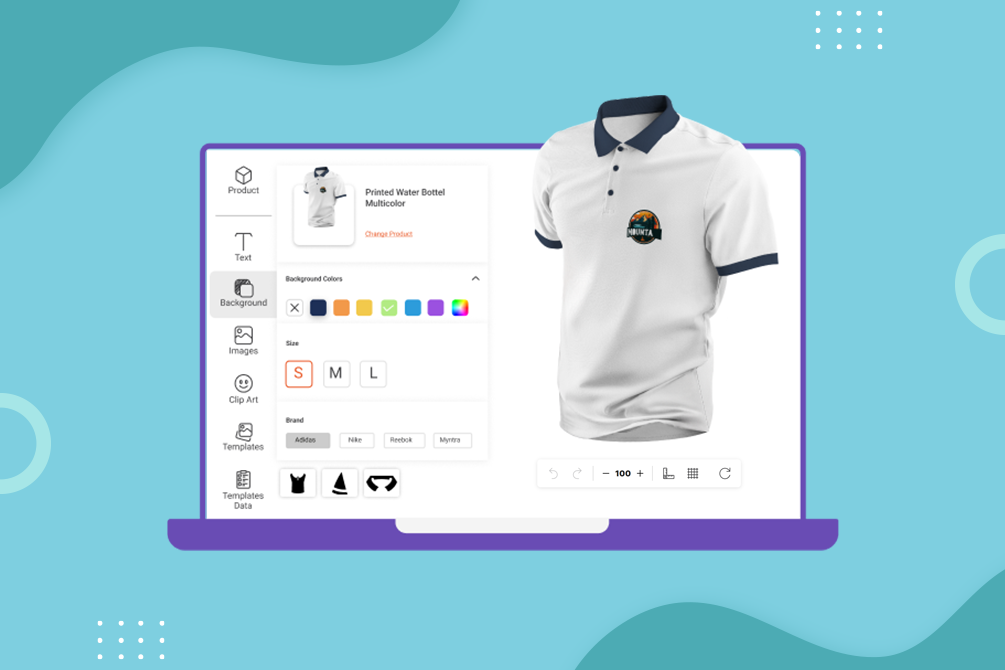
In web-to-print, this simply means that your customers can build their own version of a product. From t-shirts to hoodies and packaging boxes, customers can select any product and design it as they like. The solution allows them to customize any part, be it sleeves or collar, using their own artwork. This one feature brings customers the clarity and confidence they need right when they’re ready to buy. And beyond just customizing the product, they can zoom in, rotate, and inspect every angle before placing their order.
Now, here’s a key distinction. Product configuration and customization are different. But most people use these terms as if they mean the same thing, which only adds to the confusion.
- Product Configuration is about structure. It covers choices like fabric type, component style, finishes, cuts, and folds. In short, the elements that define the product’s physical form. When you align these elements within your configurator, you help ensure production accuracy from the very start.
- Product Customization, on the other hand, is more about the designing part. It focuses on the personal elements your customers add. Think logos, text, images, colors, or patterns—anything that lets them personalize the product to fit their vision. And when you bring 3D visualization into the mix, it stops design errors before they happen and cuts down those never-ending approval cycles.
However, the pressing challenge in this scenario is that most traditional businesses still rely on 2D previews or static PDF proofs. Let’s be real. These flat visuals just don’t show what the product really looks like. So customers end up guessing. And that guessing game leads to mismatched expectations, dragged-out approval cycles, refunds, and expensive reprints, too, in many cases. But you can wipe out these issues by enabling real-time visualization across your entire catalog.
However, with a real-time 3D configurator, customers get a “true-to-life” view of what they’re actually buying. This level of interactivity then leads to:
- More confident purchase decisions
- Fewer design-related support queries
- Significantly lower return rates
- Longer engagement and higher conversion rates
This naturally raises the question of whether the entire catalog needs to be converted into 3D to see an impact. The reality is, it doesn’t. Many businesses start with their most customized or high-return products like apparel, promotional merchandise, or trophies. You can begin with priority SKUs that directly influence buying confidence and expand once the ROI is clear.
What happens if customers are not very tech-savvy? A well-designed 3D configurator is built to be intuitive. Even non-technical users can navigate it easily. It comes with drag-and-drop uploads, ready-made templates, and clear, guided steps that make the whole process feel effortless. Plus, it’s mobile-friendly, so customers can use it from any device they want. So, the bottom line is that using this configurator, your customers, instead of feeling overwhelmed, feel empowered.
They can see the entire product come to life in real time, which ultimately builds their confidence in the purchase. And apart from that, the engagement goes up too! Once you deploy the product, even first-time users can complete configurations on their own without extra support.
Key Features to Look for in a 3D Product Configuration Tool
Not all 3D configurators are built the same. The difference between a flashy demo and a scalable solution starts to become clear when you begin managing B2B workflows, custom orders, and massive SKU catalogs.
And if you want to build something that actually delivers results, you need to focus on the right capabilities. These are the ones that make your 3D configurator more efficient, accurate, and genuinely customer-friendly from start to finish.
Now, many of these features have already been discussed throughout this blog, but let’s outline them clearly and see how you can implement them effectively. These are the must-haves that turn a good configurator into a scalable and powerful solution for your web-to-print business.
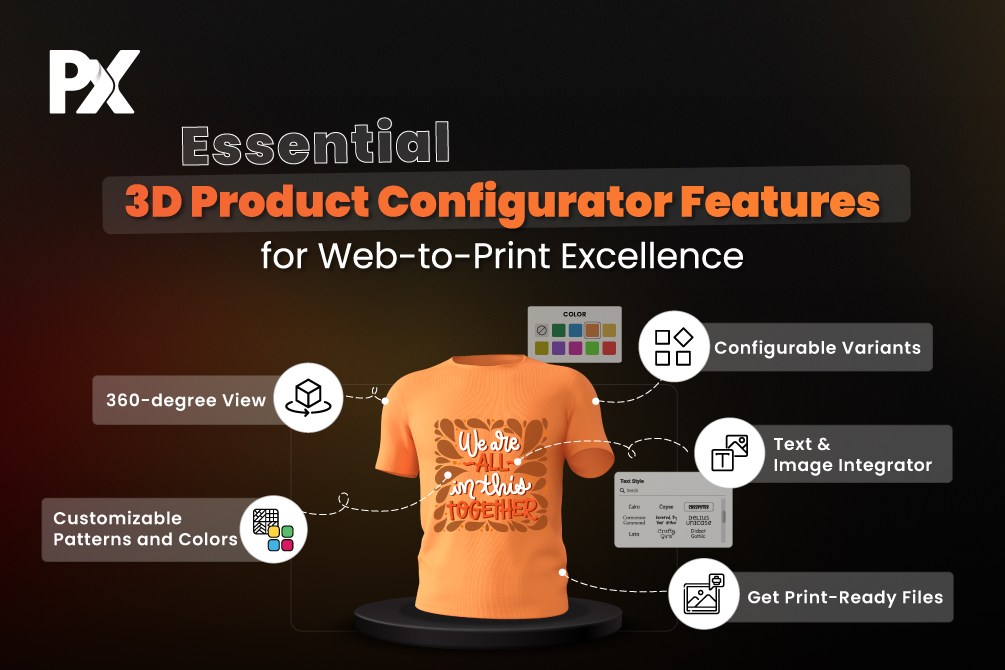
360° Visualization
Buyers want to see what they’re getting from every angle, especially when ordering in bulk. To meet that expectation, you can implement a configurator that offers smooth, full-angle previews with rotation, zoom, and texture inspection capabilities. This ensures that every detail, whether it’s a stitched logo on a sleeve or the finish on a desk leg, is visible and accurate. Moreover, providing this level of visual context helps your buyers make confident, faster purchase decisions.
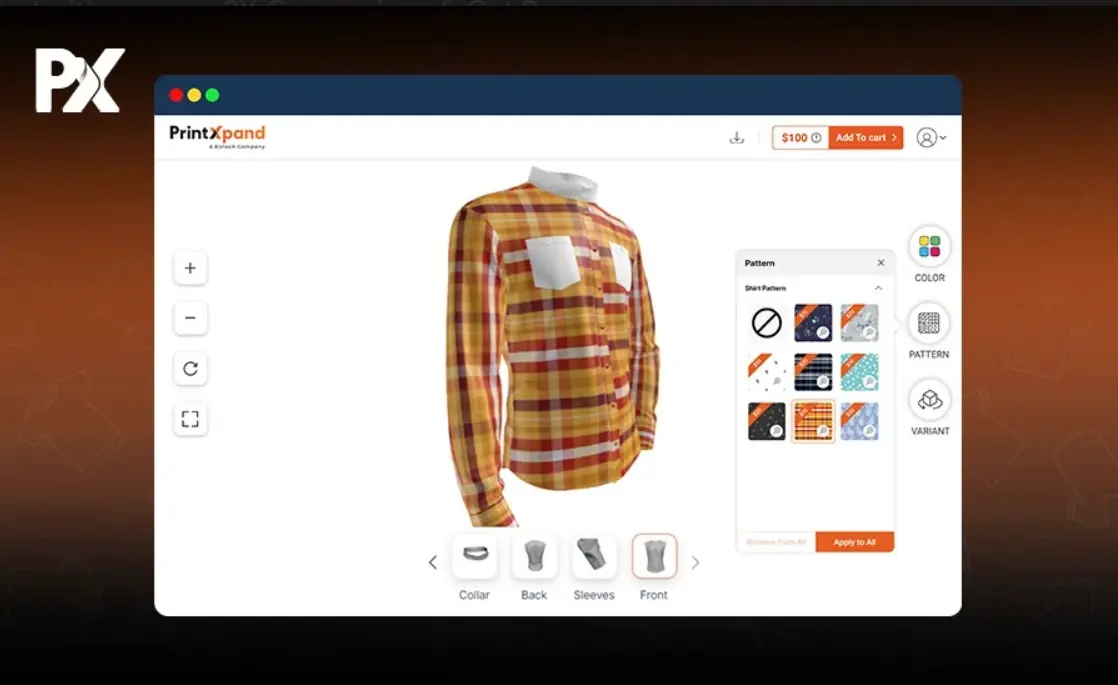
Use Case: A school can order custom uniforms for multiple campuses can approve branding placement instantly, without needing multiple samples.
Part-by-Part Configuration
Your configurator should allow users to modify specific components such as sleeves, collars, soles, handles, or panels, depending on the product. To achieve this, you can implement part-by-part configuration that gives customers granular control over every product detail. This approach not only enhances aesthetics but also supports SKU-level logic for B2B workflows. It ensures that each configurable part maps accurately to production, reducing manual intervention and improving order precision.
Use Case: A sneaker brand can let users choose lace styles, tongue materials, and sole colors, with each change updating live in the preview for instant visual feedback.
Dynamic or Live Pricing
As customers configure their products, you can implement real-time pricing updates based on materials, quantities, print methods, or design complexity. This transparency helps buyers stay within budget and minimizes hesitation near checkout, especially for large or bundled orders. Dynamic pricing ensures customers understand the impact of every choice instantly, leading to faster and more confident purchases.
Use Case: A corporate merch buyer can select embroidered branding instead of screen print and instantly see the updated unit price, helping them make quick, informed decisions.
Image Upload with Optional Color-Matching Capabilities
You can implement seamless artwork uploads, with optional color-matching capabilities that can be integrated when required. These tools extract color palettes directly from uploaded files, allowing automatic color matching and ensuring brand consistency across multiple products or variants. This reduces manual adjustments and maintains visual accuracy throughout the order process.
Use Case: A marketing agency can upload a logo once, and the configurator automatically maps its color palette across bottles, bags, and jackets in the same order.
In-Built Designer Studio
You can integrate an in-built designer studio into your configurator to allow users to add text, clipart, images, or even AI-generated prompts directly within the platform. This eliminates the need for external design tools and makes the process intuitive for non-design-savvy buyers. Providing real-time 360° editing capabilities also increases engagement and speeds up customization approvals.
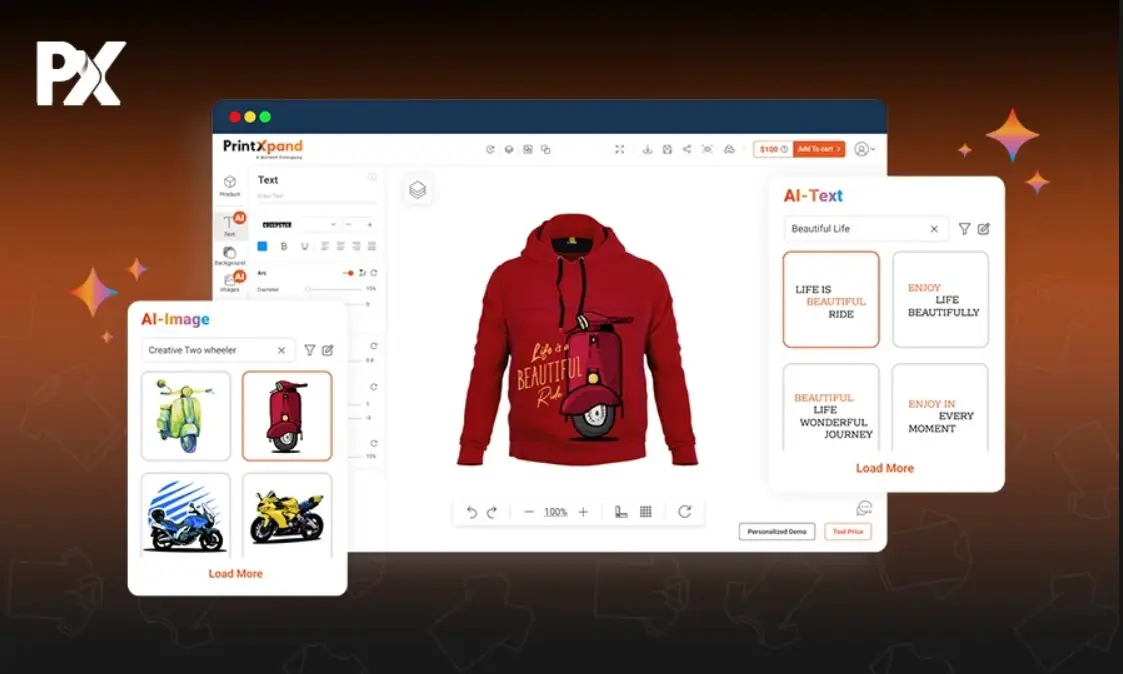
Use Case: A merch seller can personalize a jacket with team names, brand slogans, and clipart directly within the same interface, reducing design time and dependency on graphic teams.
Mobile-First Interface
You can ensure accessibility and faster decision-making by implementing a mobile-first 3D product configurator. This allows B2B buyers to review, approve, and edit orders seamlessly from any device. Optimizing for mobile with smooth performance, intuitive drag-and-drop controls, pinch-to-zoom capability, and quick load times ensures flexibility for buyers who are often on the move.
Use Case: An event organizer can finalize a bulk cap order directly from their mobile device during a site visit without needing access to a desktop.
CSV Import for Bulk Orders
You can simplify bulk ordering by implementing CSV import functionality in your 3D product configurator. This allows buyers to configure multiple units with unique details such as names, sizes, and colors—all within a single upload. By supporting CSV templates, you enable fast and accurate ordering at scale without manual intervention, which saves time and minimizes errors.
Use Case: A uniform supplier can import 500 employee shirt orders with unique names and sizes using a simple CSV file to automatically generate print-ready files for each shirt.
Lightweight, High-Performance Build
You can ensure consistent performance by using a lightweight, cloud-based 3D configurator that operates smoothly even in low-bandwidth environments. A fast and reliable build prevents slowdowns during critical stages like design previews or checkout. This is especially important for distributed teams or buyers working from different regions, where uninterrupted access directly affects usability and customer satisfaction.
Use Case: A furniture distributor in a low-connectivity region can complete an entire product configuration workflow without delays or load failures.
When you’re choosing a 3D configurator, don’t think that these are some bonus features because they’re fundamentals. The right tool should enable your customers to configure, customize, preview, and order with confidence while your team handles less back-and-forth and more fulfillment.
See how PrintXpand’s interactive 3D configurator can do all of that!
How PrintXpand’s 3D Designer Stands Apart
While many 3D product configuration tools are built for high-end fashion or enterprise-level retail, you can implement PrintXpand’s solution specifically for web-to-print businesses. It is designed for companies offering custom apparel, packaging, promotional products, or bulk personalized items.
You don’t need to rely on a complex enterprise system or a one-off custom build. Instead, you can use PrintXpand’s plug-and-play 3D product customizer, which integrates seamlessly with:
- Magento
- Shopify
- WooCommerce
- Odoo
When you implement PrintXpand’s interactive configurator, here are the perks you could leverage:
- It’s lightweight and cost-effective, meaning you don’t need to invest $50,000–$100,000 in custom development just to get started.
- It’s built for performance, offering fast, responsive experiences, even when handling complex product structures or large-volume configurations.
- With built-in SKU-level logic and CSV import support, it’s ready for real-world B2B workflows where orders often include multiple variants and personalized fields.
- It’s fully mobile-friendly and cloud-based, so there’s no need for local installs or downloads, and it performs smoothly even on moderate connections.
And because our team handles the technical heavy lifting like ongoing support, updates, and platform compatibility, you stay focused on selling, not maintaining infrastructure.
So, if you’re looking for a 3D product configurator that’s built for web-to-print, that can adapt to complex B2B workflows, and scale as your product catalog grows, PrintXpand’s 3D Designer is the perfect solution.
The Measurable Business Impact of 3D Product Configuration
Implementing a 3D product configurator goes beyond enhancing visual appeal. For web-to-print businesses, it can transform how orders are placed, approved, and fulfilled. You can achieve measurable improvements across key business metrics by integrating real-time 3D configuration into your workflow.
Here’s what you can expect to achieve with a real-time 3D configurator:
- Reduce bounce rates by 30–60% on product pages by offering live, interactive previews that keep users engaged.
- Cut returns by 15–25% through clearer customization visibility and accurate product expectations.
- Process orders twice as fast by enabling visual confirmations and bulk management via CSV imports.
- Increase conversions and AOV as customers explore upgraded materials, finishes, and add-ons during configuration.
- Save $50K–$100K compared to building a custom 3D engine from scratch.
- Scale operations efficiently without adding technical complexity or continuous development overhead.
By implementing these capabilities, you can streamline workflows, enhance customer experience, and strengthen your bottom line with predictable, measurable results.
Expert Tip:To measure ROI effectively, track both direct outcomes (like higher conversions) and indirect savings (like fewer support queries or reduced sample costs). Many businesses overlook the latter, but these efficiencies often drive long-term profitability. |
These numbers highlight the measurable gains a 3D configurator can deliver, but they also raise an important question: Does a 3D configurator only benefit B2C buyers, or can it be equally impactful for B2B businesses like yours?
While consumers enjoy interactive previews, you can create even greater value in B2B workflows. Large orders often involve multiple decision-makers and complex approval cycles. By implementing accurate, shareable 3D previews, you can align teams faster, reduce design revisions, and eliminate costly back-and-forth.
Of course, recognizing the impact is one thing—deciding whether the investment makes sense for your business is another. So, is investing in 3D configuration justified for mid-sized businesses, or is it only for enterprises?
Well, it’s no longer just an enterprise play. You can now adopt plug-and-play configurators that provide the same technology without heavy upfront costs. This makes the ROI especially compelling for mid-sized web-to-print businesses that want to minimize inefficiencies in returns or reprints while scaling efficiently.
Expert Tips for Getting Started with 3D Configuration
If you’ve decided to implement a 3D product configurator in your web-to-print business, these practical steps will help you execute the rollout effectively.
Step 1: Audit Your Current Workflow
You can begin by mapping how your current order process works — from asset management and approvals to pricing calculations. Once you have a clear picture, identify the manual steps that can be automated through a web-to-print solution. This helps you uncover the biggest opportunities for improving efficiency and reducing time-to-order.
Step 2: Check Product Compatibility
You don’t need to implement 3D visualization for every product in your catalog. Focus on SKUs where visual representation directly impacts buyer confidence and purchase decisions — such as apparel, packaging, or trophies. For simpler items like business cards or flyers, a 2D preview may be sufficient.
Step 3: Prepare Product Assets
To ensure a smooth 3D experience, use optimized 3D or 2D files that include proper lighting, UV mapping, and annotations. You can also organize fonts, color palettes, and clipart libraries in advance to align with your brand or client requirements. This preparation speeds up implementation and keeps design output consistent.
Step 4: Test All Use Cases
Before going live, test your configurator in multiple real-world scenarios. Check its performance across different screen sizes, upload types, and connection speeds. You can also simulate customer behaviors like bulk orders, unusual fonts, or large file uploads to ensure reliability under every condition.
Curious to see what kind of results you can achieve with 3D configuration?
See how PrintXpand’s configurator fits seamlessly into your existing workflow — without the overhead or complexity.